|
Texture Filters
In addition to different type of texture generator, the
AForge.NET framework provides number of filters working with textures. These filters may
be used as to create different type of nice effects, as to be utilized in different image processing
tasks.
Below is the list of implemented texture based filters and the result of their application to the
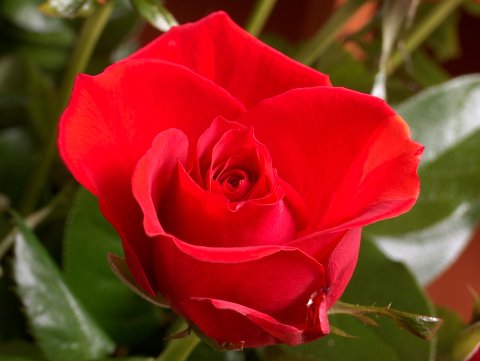
below source image.
Source image
Texturer
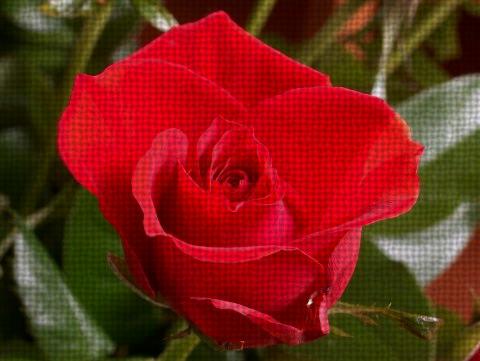
Adjust pixels’ color values using factors from the given texture. In conjunction with different type
of texture generators, the filter may produce different type of interesting effects.
// create filter
Texturer filter = new Texturer( new TextileTexture( ), 0.3, 0.7 );
// apply the filter
filter.ApplyInPlace( image );
Textured Merge
The filter does merging of two images using specified texture as coefficients balancing the amount to
take from both images. Below is a sample of merging two image with different coloring:
// create filter
TexturedMerge filter = new TexturedMerge( new CloudsTexture( ) );
// create 2 images with modified Hue
HueModifier hm1 = new HueModifier( 50 );
HueModifier hm2 = new HueModifier( 200 );
filter.OverlayImage = hm2.Apply( image );
hm1.ApplyInPlace( image );
// apply the merge filter
filter.ApplyInPlace( image );
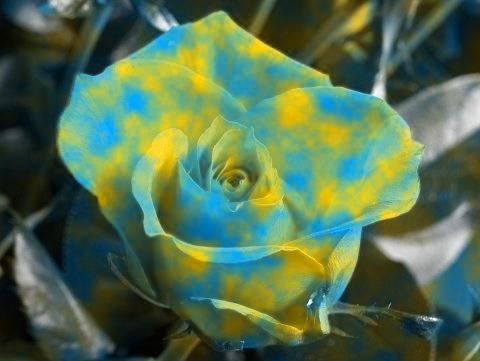
Another sample shows merging of rose image with an image filled with solid background:

Textured Filter
The filter is similar to the above one, but instead of taking 2 source images it works with one source image and 2 additional
filters. Result of those filters is merged using coefficients from the specified texture.
Below is a nice effect obtained combining original source image and result of specified color filter:

Another sample of combining 2 filters, grayscale and sepia, which may create kind of rusty effect:

Note: the filter may be used not only for creating different effects, but also used as mask filter –
it is possible to use texture as a mask, which defines regions to be processed by specified image
processing filter.
|


