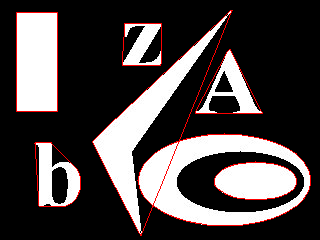
Blobs ProcessingAForge.NET framework provides set of routines aimed for blobs processing – searching Below is the list of some blobs processing tools and the result of Source image Blob Counter Base
// create an instance of blob counter algorithm
BlobCounterBase bc = new BlobCounter( );
// set filtering options
bc.FilterBlobs = true;
bc.MinWidth  = 5;
bc.MinHeight = 5;
// set ordering options
bc.ObjectsOrder = ObjectsOrder.Size;
// process binary image
bc.ProcessImage( image );
Blob[] blobs = bc.GetObjectsInformation( );
// extract the biggest blob
if ( blobs.Length > 0 )
{
    bc.ExtractBlobsImage( image, blobs[0], true );
}
Extract Biggest Blob // create filter ExtractBiggestBlob filter = new ExtractBiggestBlob( ); // apply the filter Bitmap biggestBlobsImage = filter.Apply( image );
Blobs Filtering // create filter BlobsFiltering filter = new BlobsFiltering( ); // configure filter filter.CoupledSizeFiltering = true; filter.MinWidth = 70; filter.MinHeight = 70; // apply the filter filter.ApplyInPlace( image );
Connected Components Labeling
// create filter
ConnectedComponentsLabeling filter =
    new ConnectedComponentsLabeling( );
// apply the filter
Bitmap newImage = filter.Apply( image );
Finding convex hull
// process image with blob counter
BlobCounter blobCounter = new BlobCounter( );
blobCounter.ProcessImage( image );
Blob[] blobs = blobCounter.GetObjectsInformation( );
// create convex hull searching algorithm
GrahamConvexHull hullFinder = new GrahamConvexHull( );
// lock image to draw on it
BitmapData data = image.LockBits(
    new Rectangle( 0, 0, image.Width, image.Height ),
        ImageLockMode.ReadWrite, image.PixelFormat );
// process each blob
foreach ( Blob blob in blobs )
{
    List<IntPoint> leftPoints, rightPoints, edgePoints;
    // get blob's edge points
    blobCounter.GetBlobsLeftAndRightEdges( blob,
        out leftPoints, out rightPoints );
    edgePoints.AddRange( leftPoints );
    edgePoints.AddRange( rightPoints );
    // blob's convex hull
    List<IntPoint> hull = hullFinder.FindHull( edgePoints );
    Drawing.Polygon( data, hull, Color.Red );
}
image.UnlockBits( data );
|
|||||||